A practical guide for AI automation for product marketers, built from your own task list, not someone else’s workflow.
TL;DR
- Automation advice comes at you outside-in: here’s a tool, here’s a workflow someone built on Twitter. That workflow was tuned to their context, not yours.
- Go inside-out instead. Start with your own PMM task list and ask what AI can handle and what you need to own.
- Using this framework, you get a map you can take to your manager: here’s what we can automate, here’s what we can’t, and here’s why.
- There’s a ready-made prompt below, plus three worked examples: battlecards, the monthly newsletter, and customer research. Add last quarter’s weekly updates into it and you’ll get your first automation map in one pass.
How many times has your manager asked you to automate your work with AI? Is it 1, 2, 5, or something else? For me, the answer has been too many to count. So many times that I started dreading my performance appraisal would come down to how many tokens I burned, instead of what I actually delivered. And I am not even a developer!
I’m a product marketer. I create messaging docs, battle cards, monthly newsletters, launch emails, event decks, while keeping five other teams aligned. There’s no shortage of things to automate. The question is which ones will actually be worth it.
I kept seeing go-to-market teams show off automations for shallow use cases. This made me realize: the closer a task gets to human judgment or human relationships, the worse the return on automating it.
You can generate a perfect battle card in 5 minutes. But if the sales team doesn’t trust it enough during a demo call, you’ve just lost yourself 5 minutes. You can draft a personalized cold email in seconds. But if the prospect can tell a machine wrote it, they won’t open it. This isn’t just a hunch. Older research put 60 to 70 percent of B2B marketing content as never used by sales, and newer estimates land closer to a third. Speed was never the bottleneck.
The Rotten Egg Problem
AI bandwagon fans had me believe that I needed to tokenmaxx to prove my worth. So I drank the Kool-Aid. I chased productivity goals with Claude, Gemini, and ChatGPT as my saviors and started following videos to automate random workflows.
But the execution was underwhelming. Again and again the output came out like a rotten egg: fine from the outside, but only upon cracking it open do you smell the rot. Either the workflow didn’t run consistently, or it produced something I couldn’t share without rewriting most of it. There’s a name for this. A 2023 Harvard Business School study of nearly 800 consultants found AI users were faster and better inside the tasks it’s actually good at, but 19 percentage points more likely to be wrong outside that zone. The frontier isn’t obvious until you’re already past it. AI writing feels like it’s written by a pretentious teenager: capable of deep thoughts but clearly lacking the life experience to be considered original.
The time I spent setting it up made me wonder if the whole thing was a distraction I could’ve done without. I didn’t want to hand my agency over to an agent. But I also didn’t want to be the guy in the room saying “AI doesn’t work for my job” just to get out of it. I needed a way to know which of my tasks could be reliably automated, and which I shouldn’t even attempt.
If you’re a PMM catering to customers who care about authenticity, and you want AI’s help to scale up, here’s a framework you can use to make your automations stick.
Inside-Out, Not Outside-In
Most AI advice comes at you from the outside. Here’s a tool. Here’s a workflow someone built on Twitter. Here’s what your competitor is doing. You start with the capability and go looking for a problem to point it at.
This is backwards. New tools and tutorials ship every day and we end up reacting to whatever is doing the rounds.
Go the other way. Start with what you actually do every week, the stuff sitting in your 1-on-1 notes, the tasks you’re already accountable for, and ask a narrower question: which of these can AI handle without me rewriting the whole thing?
This is a question you can answer. It doesn’t change when a new model drops.
What You Need
- Your weekly/monthly task list for at least a quarter. One you send to your manager or one culled from your 1-on-1 meeting notes.
- An LLM of your choice to do the grunt work.
The Framework: Four Buckets, Four Levels
Put your tasks in buckets.
As a product marketer, I sort everything I do into four:
- Collect data: gathering the inputs that feed the work. Pulling user insights from PRDs, reading meeting notes, checking SEO guidelines, scanning competitor sites.
- Create: making the actual deliverable. Writing the newsletter, building the battle card, drafting feature messaging.
- Organize: adapting tools, setting up workflows, defining process. One-time or recurring. Building a competitor-specific custom GPT. Setting up a monthly review cadence across content, marketing ops, and CS.
- Coordinate: getting every impacted team on the same page. Clear communication, alignment calls, handling breakdowns so things ship reliably and repeatably.
Then decide AI’s level of involvement.
For each piece of work, pick one of four levels:
- Auto-mode: AI does it end to end. You catch errors, update instructions, approve. (Interaction: agent)
- Copilot: AI drafts the whole thing. You fix. (Interaction: agent/prompt)
- Consultant: you and AI go back and forth. You’re thinking out loud, it pushes back or offers angles. You own the draft. (Interaction: prompt)
- Human-led: AI doesn’t touch this, only does a sanity check after you’ve decided. (Interaction: prompt)
Feed This into an AI Chat
Once you have your task list and buckets ready, use this prompt to get a structured breakdown. Here’s the one I use:
Actual Prompt To Use
Here are my weekly task updates from the past quarter as a [your role]:
[paste your weekly updates for the last quarter at least].

Now do three things:

1. Cluster these tasks into the larger deliverables they belong to. Some tasks
are pieces of a bigger recurring deliverable (e.g. "wrote subject line" and
"reviewed email draft" both belong to the monthly newsletter). Group them
together and name the deliverable.

2. Flag which deliverables are recurring (happens every week/month) vs. one-off.
Focus on the recurring ones, those are where automation actually pays off.
Flag it if unclear.

3. For each recurring deliverable, break it into these four columns or buckets:

Collect data: gathering the inputs that feed the work, research, data pulls,
reading notes, competitor info, talking to people
Create: making the actual deliverable, writing, designing, recording
Organize: setting up tools, workflows, templates, and processes. One-time or recurring
Coordinate: getting other teams aligned, communication, reviews, sign-offs,
handling breakdowns

Then assign each subtask one of these levels:

Auto-mode: AI does it end to end, I review
Copilot: AI drafts, I fix
Consultant: I think out loud, AI pushes back
Human-led: I do it, AI doesn't touch it

Output as a table. If a task from my list doesn't fit any recurring deliverable,
put it in a separate 'One-offs' section at the end.
Two things baked into this prompt on purpose. First, it takes messy input, not a clean deliverables list, because most of us have a raw dump of last week’s tasks, not a tidy inventory. Step 1 makes the AI do the clustering. Second, the bucket definitions are inline, because people copy this prompt away from the article, and without definitions “Organize” reads as “tidy things up” instead of “build the template and the workflow,” which is where most of the automation wins actually live.
Run it across a quarter, not one week. Recurring deliverables repeat across weeks, one-offs stay one-offs. That pattern is what makes the manager conversation credible.
What to Expect
What comes back from this process is a first draft of your automation map. It won’t be right. AI can’t tell which of your tasks actually matter and which are busywork. That’s your job.
But it’s a starting point you can take to your manager and say: here’s what I think we can automate, here’s what we can’t, here’s why.
What This Looks Like in Practice
Here’s the framework run against three deliverables I actually own as a product marketer.
1. Competition Battlecards
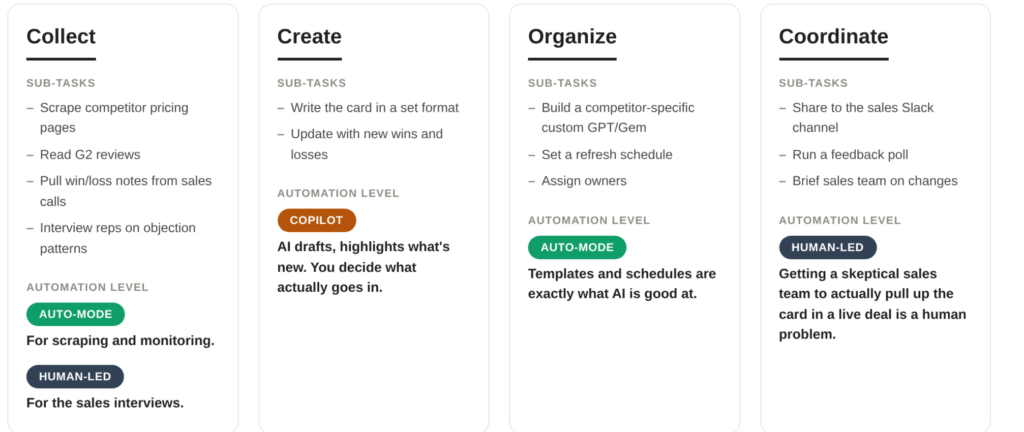
Look at the Collect row. It’s split. Half of it, scraping pricing pages, monitoring G2 reviews, can be offloaded to AI against a schedule. The other half, asking a rep why they lost that deal, is entirely human. A single verdict for the whole bucket would have hidden that.
2. Monthly Product Updates Newsletter
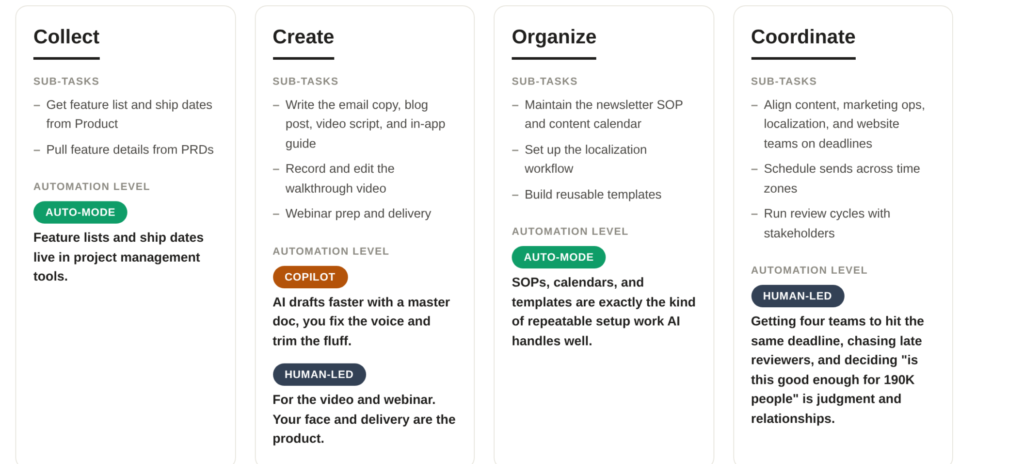
Same buckets, different shape. The newsletter’s Collect row is almost entirely Auto-mode. The human weight shifts to Create (the video and webinar) and Coordinate (the cross-team deadline pressure).
3. Customer Research
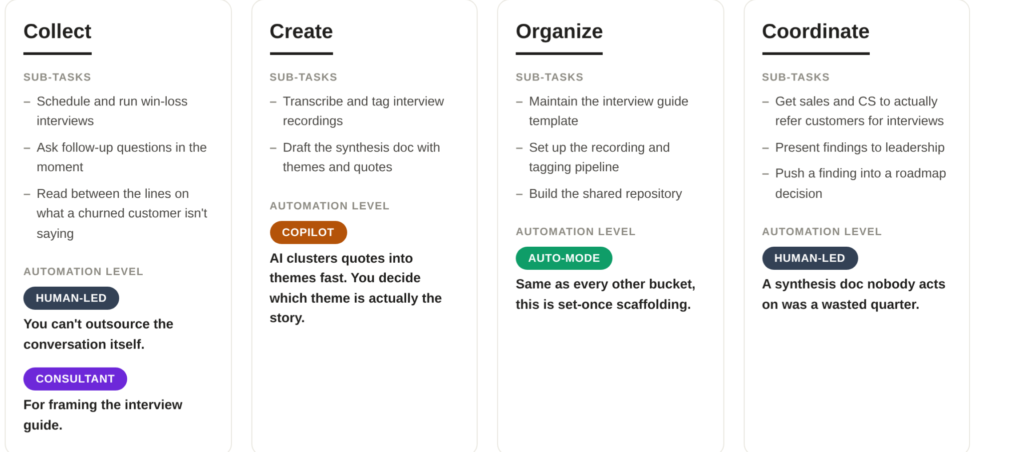
This is the mirror image of the newsletter’s Collect row. Here, Collect is the hardest bucket to automate, not the easiest. Transcription and tagging can be Copilot work once the conversation has happened, but the conversation itself, sitting with a customer who just churned and asking a question you didn’t plan to ask, is the entire value of the exercise. Hand that off to an agent and you get a survey, not research.
Same Buckets, Different Shape Every Time
Three examples, three different verdicts on the same axis:
- Organize is Auto-mode everywhere. Templates, schedules, and SOPs are set-once work, whether it’s a battle card refresh cadence or a research repository.
- Create is Copilot or Human-led, never fully automated. AI drafts, you differentiate. The newsletter needs your voice, the battle card needs your judgment on what’s worth including, the research synthesis needs you to pick which quote is the headline.
- Collect is the one to examine closely. It depends entirely on the deliverable. Feature lists sit in a project management tool and are Auto-mode. Scraping pricing pages is Auto-mode, but asking a rep why they lost is Human-led, in the same bucket. Customer interviews are Human-led almost end to end. Same label, three different verdicts.
- Coordinate is mostly Human-led. People don’t change their behavior because of an auto-generated prompt, whether that’s a sales team ignoring a battle card, a reviewer sitting on a newsletter draft, or a leadership team shelving a research finding.
That’s the whole point. If this framework spat out the same answer for every deliverable, it wouldn’t be telling you anything.
What This Doesn’t Cover
This structure audits your deliverables, not the reasoning behind them. It tells you who does the work, so you can spot automation opportunities. It doesn’t tell you whether the thing should exist, or whether the decision to do it is right.
Deciding what your product is, who it’s for, and why it beats the alternative: that’s assumed human. It’s not in the buckets because it was never an automation candidate. If you apply this framework and end up producing wrong deliverables faster, you’re optimizing the wrong layer.
Be Grounded with Data
Here’s what you might have already noticed about the AI hoopla. Skeptics refuse to give in, saying it’s all a ploy to fund Silicon Valley yachts. Industry shills are still promising AGI in three years to push FOMO down our throats. Neither position helps you on Monday morning’s discussion with your manager.
What’s needed is a calm, considered look at what you do every day. Insights derived from tried-and-tested workflows will help you have an honest discussion, without the hype-chasing or unrealistic expectations. Go inside-out. Start with what’s in your control, instead of outside-in and what everyone else expects of you.